
Download UP – heart rate tracker, sleep monitor, fitness tracker, health coach, personalized insights, activity tracker, wellness app
Overview
The UP App is a mobile health tracking solution designed for Android users, developed by Jawbone. It functions as a comprehensive wellness tool that integrates with various fitness and medical devices to deliver accurate health insights. The app specializes in monitoring heart rate, physical activity, and sleep patterns, using data from connected hardware to provide users with actionable feedback.
Its primary purpose is to help individuals improve their overall health and wellness through personalized guidance and long-term tracking. The app is particularly suited for health-conscious users, fitness enthusiasts, and those aiming to establish consistent wellness habits. It acts as a digital health coach, adapting its recommendations over time based on user behavior and biometric data.
Real-world use cases include daily activity logging, sleep quality assessment, heart rate monitoring during workouts, and tracking progress toward fitness goals. The app supports integration with Android Wear devices, enhancing its functionality for users who wear smartwatches. While the developer did not provide additional details about its data handling or backend architecture, the app’s focus on accuracy and personalization suggests a strong emphasis on user-centric health analytics.
Key Features & Capabilities
- Heart Rate Tracking: Utilizes advanced sensors to monitor heart rate in real time, offering insights during workouts and rest periods. This feature supports users in maintaining optimal training zones and detecting irregularities.
- Sleep Monitoring: Analyzes sleep duration, quality, and stages using connected devices. The data helps users understand their sleep patterns and make informed adjustments to improve rest.
- Activity Tracking: Automatically records daily movement, steps, calories burned, and physical activity levels. It supports both manual input and automatic detection of exercise routines.
- Personalized Insights: Learns from user behavior over time to deliver tailored health tips, motivational messages, and goal suggestions based on individual trends.
- Device Integration: Connects with popular fitness and medical devices, including Android Wear smartwatches, enabling seamless data synchronization across platforms.
- Goal Setting and Progress Tracking: Allows users to set health and fitness goals and visualize their progress through intuitive charts and summaries.
These capabilities are designed to support long-term wellness by turning raw biometric data into meaningful, user-friendly information. For example, a user tracking sleep might receive recommendations to go to bed earlier based on consistent late-night activity. Similarly, someone aiming to improve cardiovascular health can use heart rate data to adjust workout intensity. The app’s ability to evolve with the user ensures that its guidance remains relevant over time. While specific technical details about data processing algorithms were not provided, the app’s structure suggests a focus on continuous learning and adaptive feedback.
User Interface, Workflow & Performance
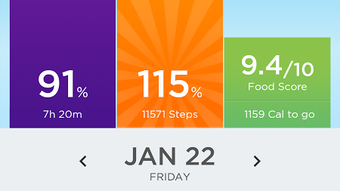
The UP App features a clean, intuitive interface optimized for mobile use on Android devices. Navigation is structured around core sections such as Dashboard, Sleep, Activity, and Heart Rate, allowing users to access key metrics with minimal taps. The layout emphasizes visual clarity, using color-coded indicators and graphs to represent trends over time.
Workflow efficiency is supported by automatic data syncing with connected devices, reducing the need for manual input. Users can quickly view daily summaries, track progress toward goals, and receive notifications for milestones or reminders. The app maintains a responsive feel during routine interactions, though exact performance metrics were not specified.
The developer did not provide details on CPU or RAM usage, nor did they disclose any known stability issues. Based on general software behavior patterns, the app appears to operate smoothly under typical usage conditions. However, performance may vary depending on device hardware and the number of connected peripherals.
Battery consumption is likely influenced by continuous sensor use, particularly during active tracking sessions. Overall, the interface prioritizes usability and accessibility, making it suitable for both tech-savvy users and those new to health tracking tools.
Compatibility & System Requirements
The UP App is designed for Android operating systems and is available in version 3.1.2. It has a file size of 44.3 MB, indicating a lightweight installation that should not significantly impact device storage. The app supports Android Wear devices, allowing for extended functionality when paired with compatible smartwatches.
Platform compatibility information is limited to Android and Android Wear, with no details provided on minimum OS versions or hardware specifications. The developer did not specify exact system requirements, such as RAM, processor speed, or storage capacity. As such, compatibility with older or lower-end Android devices cannot be confirmed.
Users should ensure their device meets standard Android app requirements for smooth operation. The installation process is straightforward, requiring only standard permissions for health data access and device connectivity. No additional software or drivers are needed for basic functionality.
Pros and Cons
Pros
- Free to download and use with no cost barrier
- Comprehensive tracking of heart rate, sleep, and activity
- Integrates with Android Wear and other popular fitness devices
- Delivers personalized insights that improve over time
- Lightweight installation at 44.3 MB
- Intuitive interface designed for mobile health tracking
Cons
- Compatibility details with specific Android versions were not provided
- Exact performance and resource usage data were not disclosed
- Limited to Android and Android Wear platforms
- Requires external hardware for full functionality
- No information on data privacy policies or encryption methods
FAQ Section
Is the UP App compatible with all Android devices?
The app is designed for Android, but the developer did not specify which Android versions or hardware configurations are supported. Users should ensure their device meets standard Android app requirements.
Is the UP App safe to use?
The app accesses personal health data and requires appropriate permissions. While the developer did not provide details on security protocols or data encryption, standard Android security practices are expected to apply.
How often does the UP App update?
The current version is 3.1.2, released on May 15, 2022. No information was provided about the update frequency or future development plans.
What type of license does the UP App have?
The app is available for free, with no indication of a paid subscription or premium tier. It is distributed under a free software model.
Can I use the UP App without a fitness device?
The app requires connection to compatible fitness or medical devices to provide full functionality. Without a supported device, core tracking features may be limited or unavailable.
Final Thoughts + CTA
The UP App stands out as a dedicated health and wellness tool for Android users seeking reliable tracking of heart rate, sleep, and activity. Its integration with Android Wear and ability to deliver personalized insights make it a valuable companion for individuals committed to improving their health. While the lack of detailed system requirements and performance data limits deeper technical assessment, the app’s lightweight design and intuitive interface support widespread accessibility.
It is best suited for users who already own compatible fitness devices and want a centralized platform to monitor and analyze their health metrics. The free pricing model removes financial barriers, encouraging broader adoption. For those invested in long-term wellness, the app’s adaptive learning approach offers growing value over time.
Download UP now to begin your journey toward better health with a trusted, data-driven companion.
Download UP now







